
Install mobrule on Windows
mobrule ships as a single NSIS installer (Mobrule_x.y.z_x64-setup.exe). It
installs per-user, with no administrator prompt, and bundles both the Dashboard and
the bridge daemon.
Running the installer
Section titled “Running the installer”Double-click the downloaded *-setup.exe and follow the wizard: accept the
license, confirm the install folder, and let it finish. Because the install is
per-user it lands under your own profile and never asks for elevation.
The SmartScreen “unknown publisher” warning is expected
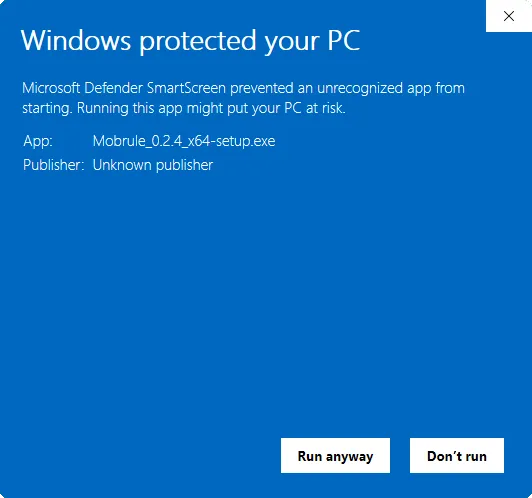
Section titled “The SmartScreen “unknown publisher” warning is expected”The v1.0 installer is unsigned. Windows SmartScreen will show a blue “Windows protected your PC” dialog naming an unknown publisher the first time you run it. This is expected for an unsigned build. It is not a sign that the download is corrupt or compromised.
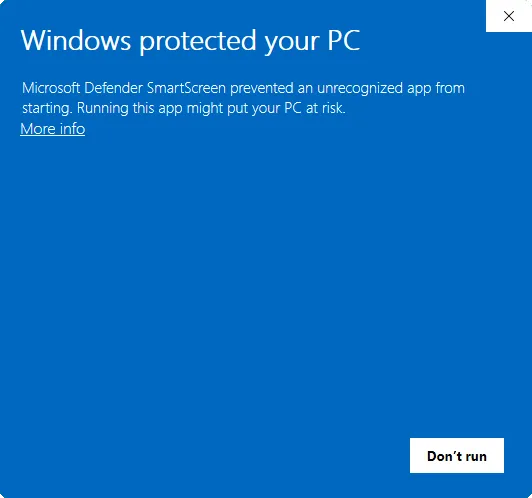
To proceed, click More info, then Run anyway. If you would rather not, download only from the official release page and check the published checksum before running.
A signed installer (which removes this warning) is planned for a later release.
Checking the checksum
Section titled “Checking the checksum”Every release publishes a SHA-256 checksum next to the installer on the release page. To verify your download, open PowerShell in the folder you downloaded to and run:
Get-FileHash .\Mobrule_x.y.z_x64-setup.exe -Algorithm SHA256Compare the printed hash against the one on the release page (case doesn’t matter). If they match, the file you have is byte-for-byte the file that was released. If they don’t, delete the download and fetch it again from the official release page. Do not run a file whose hash doesn’t match.
WebView2 runtime
Section titled “WebView2 runtime”The Dashboard renders through Microsoft’s WebView2 runtime. The installer provisions it for you: if WebView2 is missing it downloads and installs the runtime as part of setup, so you do not need to install it separately.